
Resources

PUSD Learning Resources

Employee Orientation Slide Deck (Click Image Above)
IA SPED Learning Resources – Virtual Series, etc.
Behavior Support Team Training Resources
PUSD Learning Center (Canvas Course)
- Grade specific trainings
- Health Tech Trainings
Social Emotional Learning Resource
IA TK – Approaches to Play Training by SDCOE (Padlet)
Outside Learning Resources
Resources for Instructional Assistants and Paraprofessionals
https://docs.google.com/document/d/1hq_X5Ot-un2hrBh8s-nT91g2Xcvn80rnWcgMKvlhIYQ/edit?usp=sharin
Find Recordings and Powerpoints from the Most Recent Pro Grow Day on the PSEA Professional Growth Day tab:
Professional Growth Days – Poway School Employees Association (poway-psea.org)
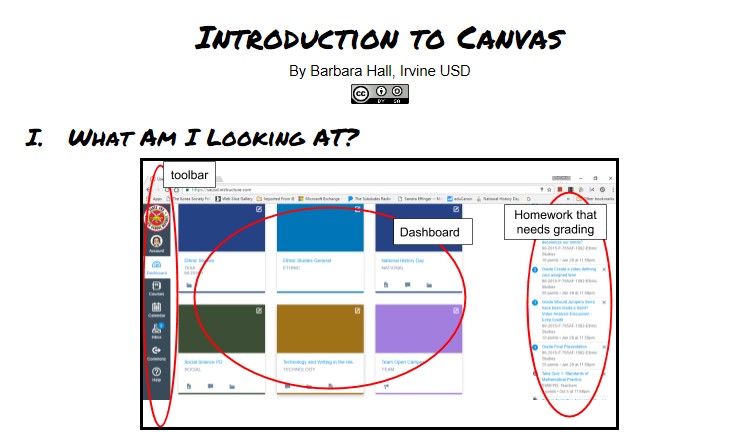 Click image above to access tools
Click image below to watch video
The PUSD Zoom for Education and Canvas courses have been created through Canvas. The Technology & Innovation Department has created virtual learning platforms. These courses are located in your PUSD Canvas dashboard. Steps to access Canvas:
- 2020 “Canvas Adventure”: https://poway.instructure.com/enroll/GCETNX
- Login with their username (no @powayusd.com) and password to login in to Canvas to access the course..
 Google: Mr. Alfredo Hernandez’s How To Short Videos:
- G Suite Mega Resource (all the little “how to’s”)” https://docs.google.com/document/d/1NfeB5QwqWxCnfDLuK00jEs_4dMNSfeY7LPC59r06UaY/edit
- Getting Started with Google Docs – https://drive.google.com/file/d/1q5QWp52kS9HwIl2yIBXGBox11rkuCObe/view?usp=sharing
- Signing in to Google Drive – https://drive.google.com/file/d/1DYPW1hJ_z3BXHO0ZRuHDYphjEx7Qtx75/view?usp=sharing
- Files in Google Drive – https://drive.google.com/file/d/1U9g95ZVk-ukegXI9e7DDG4pZAINXWOKw/view?usp=sharing
- Moving Files – https://drive.google.com/file/d/1Y8u3Ky-n6BjQd2cN1BB3OmwS5sZl6zNg/view?usp=sharing
- Sharing Permissions – https://drive.google.com/file/d/1Td2G7UH-mUD9ezzNaWHBRt-Pr5YteLq6/view?usp=sharing
- Tables, Graphics and Images – https://drive.google.com/file/d/1wBsE_s3fMCFo7f8HbfCTIA4HoEJxKwNV/view?usp=sharing
Learn the basics of G Suite for Education (click here to access link) – For more extensive Google Training. This site provides 13 units of “basics” with lessons and a progressive set of tips designed to help educators make the most of Google’s classroom technology.
Updated Content Available through LinkedInLearning – Courses on communication, time management, how to use technology such as AI, Microsoft, Canvas, etc.
Contact Melanierodriguez@powaysea.org for a free LinkedIn Learning license

| Google (Essential Training through Advanced Techniques) |
| Getting Things Done – Time Management & Productivity |
| Effective Listening / Communicating with Confidence |
| Learning How to Increase Learning Engagement |
| Leading with a Growth Mindset |
| The Six Morning Habits of High Performers |
| How to be an Adaptable Employee During Change & Uncertainty |

